Omnichannel Marketing Checklist for Shopify Owners
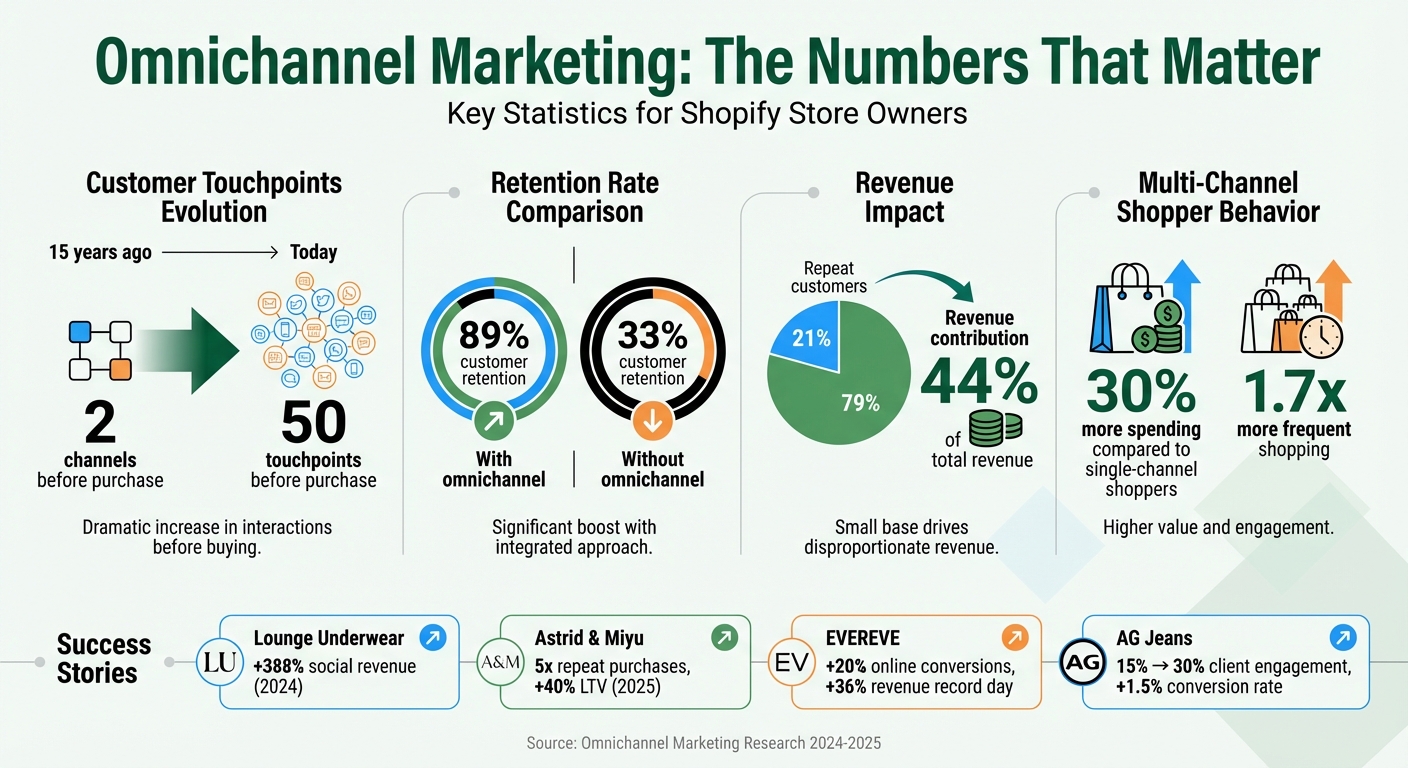
If you're a Shopify store owner, omnichannel marketing is about creating a consistent shopping experience across all platforms your customers use - whether that's Instagram, emails, SMS, or even in-store. Why does this matter? Because buyers interact with around 50 touchpoints before making a purchase today, compared to just two channels 15 years ago. Brands that embrace this approach see 89% customer retention rates, compared to only 33% for those that don’t.
Here’s a quick summary of what you’ll learn in this checklist:
- Audit your channels: Identify where customers interact with your brand and fix any disconnected systems.
- Segment your audience: Use Shopify data to group customers based on behavior, preferences, and purchase habits.
- Unify your data: Sync customer records, inventory, and sales channels into one system for consistent messaging.
- Use AI tools: Automate workflows, personalize campaigns, and predict customer behavior for better results.
- Test and refine: Monitor performance, tweak campaigns weekly, and focus on cross-channel metrics like Blended CAC and LTV.
For example, Lounge Underwear boosted social revenue by 388% in 2024 by connecting their Instagram followers to their Shopify store. Similarly, Astrid & Miyu increased repeat purchases fivefold in 2025 after integrating their retail and online data.
Key takeaway: Modern buyers expect brands to meet them on their favorite platforms with consistent, personalized experiences. This guide helps you make that happen by combining Shopify's tools with AI-powered solutions like Messagesuite.
Omnichannel Marketing Statistics and Impact for Shopify Stores
Shopify & Gym+Coffee Q&A Omnichannel Commerce Strategies to Drive Growth
sbb-itb-e5ef79e
Preparation Steps for Omnichannel Marketing
Before diving into omnichannel campaigns, it’s essential to map out all customer touchpoints. Disconnected systems - like email, social media, SMS, and in-store platforms - can lead to gaps in the customer experience and wasted resources. These steps will help establish a solid base for consistent, AI-driven omnichannel strategies.
Audit Your Current Marketing Channels
Start by taking a close look at all your marketing channels. Map out every point where customers interact with your brand - whether it’s your Shopify store, email campaigns, SMS notifications, social media profiles, physical locations, or online marketplaces. Look for areas where data might be siloed, such as unsynced inventory or manual reporting processes.
It’s also important to check if you’re able to track customer journeys across multiple devices. Tools like Google Analytics 4 with its Data-Driven Attribution and User-ID tracking can help connect these cross-device interactions. Additionally, ensure your brand maintains a consistent voice, visuals, pricing, and promotional offers across all platforms.
For example, EVEREVE successfully integrated their online and physical operations into one system. This move increased their online conversions by 20% and led to a record sales day with 36% higher revenue.
Define Customer Segments and Preferences
Segmentation is key to making your campaigns resonate. Generic messaging rarely works, so use insights from Shopify to divide your audience based on purchase behavior, preferences, and motivations. For instance, some customers might be drawn to daily rituals, while others are looking for practical solutions. Tailored messaging based on these insights can make your campaigns more effective.
Dive deeper into customer data by analyzing purchase frequency, average order value, product categories, and preferred channels. Some customers might respond better to SMS than email, while VIP shoppers could prefer in-store pickup. AG Jeans, for example, doubled client engagement from 15% to 30% and improved conversion rates by 1.5 percentage points through targeted strategies.
To go beyond raw data, combine Shopify analytics with qualitative insights from surveys or customer interviews. This can help uncover the reasons behind purchasing habits and identify which channels each segment prefers for discovering, researching, and buying products.
Unify Customer Data Across Channels
Unified commerce is all about consolidating sales channels, inventory, and customer records into a single system. Review your tech stack to eliminate redundant tools and reduce manual data syncing.
Use identity resolution methods, such as deterministic matching (via email or phone) and AI-based probabilistic matching, to create a complete view of your customers. Additionally, tools like Meta’s Conversions API can help bypass challenges like ad blockers and cookie restrictions, ensuring accurate data collection.
Astrid & Miyu demonstrated the power of unified data when they integrated their retail and online operations in 2025. This integration resulted in a fivefold increase in repeat purchases and a 40% boost in customer lifetime value.
When your data flows seamlessly, it opens the door for automated actions like upgrading a customer to VIP status or sending timely reminders for abandoned carts.
Setting Up Messagesuite for Omnichannel Campaigns
Once your customer data is unified, Messagesuite helps you transition smoothly to delivering consistent messaging across multiple channels. By integrating WhatsApp, RCS, SMS, and email, you can manage your entire omnichannel strategy from one centralized dashboard. Here’s how to set it up for your Shopify store.
Install and Configure Messagesuite in Shopify
Start by visiting the Shopify App Store and searching for Messagesuite. Click "Add app" and then "Install" to grant the necessary permissions. The app will need access to your customer profiles, product catalogs, collections, and order history to work effectively. After installation, log in to the Messagesuite dashboard to access your unified inbox and manage all communication channels.
Within the dashboard, enable and customize each channel to align with your store’s branding - this includes adding your logo, selecting colors, and setting agent names. To ensure the omnichannel widget works correctly, whitelist your store’s URL (e.g., https://yourstore.myshopify.com/) in the app’s settings. Then, copy the provided code snippet and paste it into your Shopify theme’s theme.liquid file just before the closing </body> tag. Don’t forget to back up your theme before making changes.
Once the setup is complete, run a quick test. View a product, add it to your cart, and place a test order to confirm that events like product views and purchases are syncing properly. Also, check that your SMS and email collection processes include explicit consent at checkout to comply with TCPA and CAN-SPAM regulations.
Enable AI-Powered Segmentation
Messagesuite’s AI tools automatically segment customers based on their purchasing habits, engagement levels, and preferred communication channels. By combining data from Shopify, your CRM, and other connected systems, Messagesuite creates a comprehensive customer profile. Activating visitor tracking allows you to monitor customer interactions across devices and chat apps, capturing their entire journey.
Set up behavioral triggers, such as email opens, SMS clicks, or abandoned carts, to let the AI segment users by intent. This helps predict which groups are most likely to respond to specific offers. Retailers using this approach have been shown to retain up to 90% more customers and experience engagement rate increases of up to 250%. With 57% of consumers saying they’re willing to spend more with brands that personalize their experiences, AI-powered segmentation gives you an edge in customer retention and engagement.
Once segmentation is active, ensure your product data stays synchronized for consistent messaging across all channels.
Sync Product Catalogs and Inventory
Keeping your product data updated in real time ensures that your messaging always reflects accurate prices, descriptions, and availability. During setup, choose your primary product identifier - either the Shopify Variant ID or SKU. If you opt for SKUs, make sure each one is unique to avoid sync errors. Conducting a SKU audit beforehand can help prevent issues caused by duplicates.
Messagesuite automatically updates product information whenever changes are made in Shopify. This includes syncing product titles, variant images, prices, "compare at" prices, inventory levels, and product URLs. To maintain data accuracy, always update product details directly in Shopify rather than within Messagesuite. After the initial sync, double-check that the updated product information appears correctly in the live view to confirm synchronization is working as expected.
Running Omnichannel Campaigns With AI Tools
Once you've got your product data organized and customer segments fine-tuned, you're ready to roll out AI-driven campaigns across multiple channels. Tools like Messagesuite simplify the process by automating workflows, optimizing send times, and letting you focus on the bigger picture - your strategy.
Build Automated Campaign Workflows
Start by identifying 25 key touchpoints in your customer's journey - like order tracking, abandoned carts, or post-purchase upsells - and design workflows that target these moments effectively.
Messagesuite's workflow builder makes it easy to create multi-step sequences with conditional logic. For example, if a customer abandons their cart, you could send an email within an hour and follow up with an SMS two hours later if there's no response. For post-purchase campaigns, you might send a thank-you message right after checkout, followed by personalized product recommendations a few days later, based on their purchase.
You can integrate these workflows with Shopify data in real time, ensuring details like order status and tracking numbers are always accurate. Train the AI to use customer-friendly language that feels natural and aligns with your brand. And don't forget to set up escalation rules - if the AI encounters a high-stakes issue, like a frustrated customer or a chargeback threat, it should seamlessly hand off the case to a human agent.
"Automation should do three things: Answer instantly, take action, and escalate smartly." - MessageMind
When launching your first workflow, start small. Test it during off-hours or on a single channel, then use analytics to tweak and improve weekly. Businesses that leverage customer behavior insights in their workflows see 85% higher sales growth compared to those that don't.
Once your workflows are running smoothly, focus on keeping your messaging consistent across all channels.
Customize and Test Messaging for Consistency
After building workflows, ensure your messaging feels cohesive and reflects your brand identity. Use branded templates in Messagesuite's editor to maintain visual consistency. Upload your logo, pick your brand colors, and standardize fonts so your communications are instantly recognizable.
Decide on your brand's tone of voice - whether it's professional, playful, or somewhere in between - and stick to it. This consistency should carry through every channel, whether you're sending a cart reminder via SMS or announcing a product launch in an email.
Before going live, test your templates across devices to ensure everything looks right. Check that images load properly, links work, and formatting stays intact on both iOS and Android. For SMS, keep messages under 160 characters to avoid them splitting into multiple texts.
Run A/B tests on different elements like subject lines, emojis, and send times to see what resonates most with your audience. Messagesuite's AI can even identify which channels your customers prefer and automatically adjust future communications to match their habits [37,38].
Launch and Monitor Campaigns
Once your campaigns are ready, it's time to go live and track their performance. Use the unified dashboard to deploy campaigns during peak engagement hours. Messagesuite's smart send time feature ensures messages land when customers are most likely to engage.
Keep an eye on key metrics like reach, sessions, orders, conversion rates, and net sales. Monitor how well the AI handles customer inquiries by tracking automated resolution rates, and measure conversion assist rates to see how pre-purchase conversations influence sales.
Cross-channel attribution is crucial. For instance, a customer might interact with an Instagram ad, an email, and an SMS before making a purchase. Understanding how these channels work together helps you refine your strategy and allocate your budget more effectively. Fun fact: customers who shop across multiple channels spend about 30% more and shop 1.7 times more often than those who stick to a single channel.
Review your AI's performance weekly to identify any areas for improvement. If the system hesitates or struggles to resolve queries, adjust its parameters. Similarly, tweak workflow timing if you notice drop-offs at specific steps. Finally, keep a centralized promotion calendar to avoid overwhelming customers with overlapping campaigns.
Analyzing and Scaling Your Omnichannel Marketing
Review AI-Driven Analytics
Once your campaigns are live, it’s time to dig into the numbers and assess how well everything is performing. Instead of relying on individual reports for each channel, focus on blended metrics that give you a complete picture. For example, calculate Blended CAC (total ad spend ÷ new customers) and Blended ROAS to evaluate cross-channel performance. Also, track Customer Lifetime Value (LTV) by acquisition channel to understand which platforms bring in repeat buyers. This is crucial because repeat customers, though they account for just 21% of your customer base, contribute a whopping 44% of total revenue.
Take advantage of GA4's Data-Driven Attribution (DDA) to assign conversion credit across the entire customer journey, rather than just the last click. Dive deeper with cohort analysis, grouping customers by their first purchase date or campaign, to uncover patterns in retention over time.
"A blended model shifts the question from 'Which one channel worked?' to 'How do my channels work together to drive sales?' That perspective shift is everything." - MetricMosaic
Unified commerce systems that integrate online and offline operations have shown real-world results, like improved conversion rates and record-breaking sales days.
Optimize Segments and Campaigns
Use the insights from your analysis to fine-tune customer segments and campaign strategies. For instance, identify customers who haven’t purchased in over 60 days and re-engage them with targeted win-back campaigns through SMS or email [[21]](https://www.pushowl.com/blog/ shopify-omnichannel-marketing-strategy). Experiment with A/B testing to compare different messaging styles, such as narrative-driven content versus discount-focused promotions, across various customer groups like prospects and active buyers [[21]](https://www.pushowl.com/blog/ shopify-omnichannel-marketing-strategy).
Dig into product-level profitability by linking sales data with your Cost of Goods Sold (COGS) to find hidden opportunities - like low-volume but high-margin items - or to identify loss leaders. Tools like Shopify Flow can help streamline operations by automatically pausing marketing efforts for out-of-stock products, saving you from wasting ad spend. A great example of this is AG Jeans, which revamped its operations with a Shopify-centric system and multi-location POS. The result? A 1.5% boost in conversion rates and a jump in clienteling penetration from 15% to 30%, thanks to better-targeted segmentation strategies.
Scale With Advanced Features
Once your campaigns are optimized, take things to the next level with advanced tools. For example, Messagesuite's Enterprise plan offers features like RCS messaging, custom integrations, and a helpdesk to handle high-volume workflows. RCS messaging allows you to send interactive, branded messages with buttons and carousels to Android users - perfect for product launches or time-sensitive deals.
You can also implement rule-based inventory allocation to safeguard your margins by reserving stock for high-value direct-to-consumer channels. Keep a close eye on your 60-day CAC payback to ensure that new customer profits quickly offset acquisition costs.
A standout case study: In 2025, 123 Baby Box reactivated 27% of lapsed users using a combination of push notifications and a $10 credit email. The cost? Just $0.22 per reactivated user. These returning customers went on to spend an average of over $120 within 60 days. That’s the power of scaling with precision and strategy.
Conclusion
Omnichannel marketing isn't about being everywhere; it's about meeting your customers where they are and delivering a consistent, seamless experience. As highlighted in this checklist, success hinges on three key components: unified customer data, AI-driven personalization, and integrated touchpoints that work together harmoniously. These elements don't just streamline operations - they drive measurable outcomes.
A well-executed omnichannel strategy can significantly boost retention and spending. Consider this: repeat customers account for 44% of total revenue, even though they make up just 21% of your customer base. That kind of impact underscores the importance of aligning every step of the customer journey.
Messagesuite simplifies the complexities of omnichannel marketing by uniting email, SMS, WhatsApp, and RCS into one intuitive dashboard, fully integrated with your Shopify store. With AI-powered segmentation, automated workflows, and real-time analytics, the platform ensures every message amplifies your storefront's reach and effectiveness. It takes care of the technical details, so you can focus on what truly matters - building lasting relationships and driving revenue.
"Omnichannel retail doesn't need you to be everywhere - just everywhere your customers are." - Shopify
FAQs
Which channels should I prioritize first for omnichannel?
Start by focusing on the platforms your customers already use frequently and that are simple to connect with, such as social media (think Instagram and TikTok), email, and SMS. These channels are key for delivering personalized, consistent messages while shaping the customer journey. After building a strong foundation with these digital tools, you can branch out to include in-store interactions or live chat to further enrich the experience. However, prioritizing social media, email, and SMS at the start will deliver the most noticeable results.
How do I unify customer data across Shopify and in-store?
To bring all your customer data together, integrate information from every sales channel into one centralized system. Leverage tools that link your Shopify store with in-store POS systems, allowing you to monitor purchases, preferences, and interactions across platforms. With real-time synchronization, you can provide a smooth customer experience, cut unnecessary costs, and tailor personalization efforts. This unified approach gives you a complete view of each customer, which is essential for successful omnichannel marketing and building strong customer relationships.
What metrics best prove omnichannel ROI on Shopify?
When evaluating omnichannel ROI on Shopify, there are three key metrics to keep an eye on: blended Customer Acquisition Cost (CAC), customer lifetime value (LTV), and attribution data.
- Blended CAC helps you understand how much you're spending to acquire a customer across all channels combined, offering a clear picture of your overall investment.
- LTV reveals the total revenue a customer generates over their relationship with your business, helping you identify high-value customers.
- Attribution data tracks how customers interact with your brand across different touchpoints, so you can pinpoint which campaigns or channels are driving the best results.
By focusing on these metrics, you’ll gain a better understanding of the customer journey, spot profitable campaigns, and refine your strategy for stronger outcomes.