
10 Marketing Automation Workflows That Boost Revenue
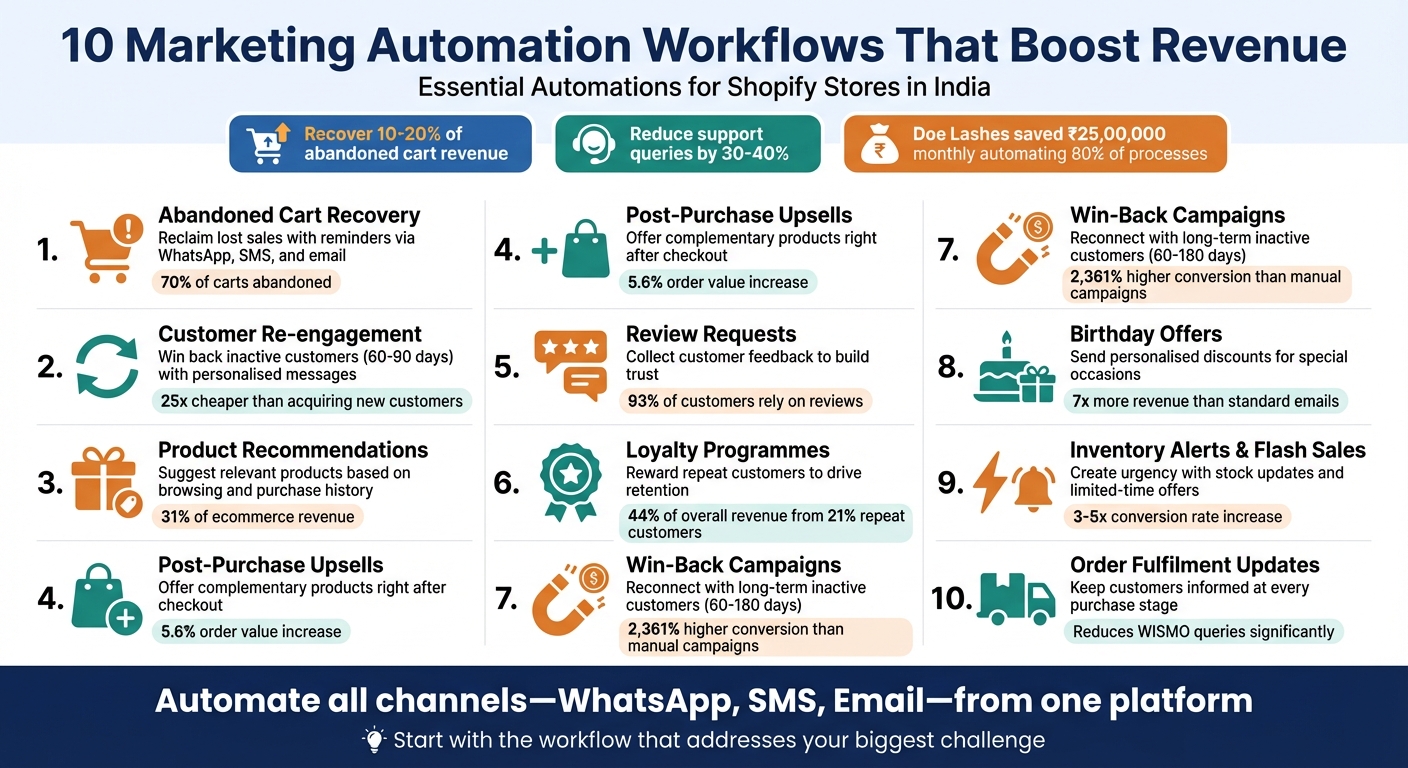
Running a Shopify store in India can be challenging with repetitive tasks like sending order updates, recovering abandoned carts, and engaging inactive customers. Automation workflows simplify these tasks, saving time and increasing revenue. For example, Doe Lashes saved ₹25,00,000 monthly by automating 80% of their processes, and automated cart recovery alone can reclaim 10–20% of lost revenue. WhatsApp automation, in particular, reduces customer support queries by 30–40%, while boosting engagement.
Here’s a quick overview of 10 effective automation workflows to grow your Shopify store:
- Abandoned Cart Recovery: Reclaim lost sales with reminders via WhatsApp, SMS, and email.
- Customer Re-engagement: Win back inactive customers using personalised messages.
- Product Recommendations: Suggest relevant products based on browsing and purchase history.
- Post-Purchase Upsells: Offer complementary products right after checkout.
- Review Requests: Collect customer feedback to build trust and increase conversions.
- Loyalty Programmes: Reward repeat customers to drive retention and sales.
- Win-Back Campaigns: Reconnect with long-term inactive customers with tailored offers.
- Birthday Offers: Send personalised discounts to celebrate special occasions.
- Inventory Alerts & Flash Sales: Create urgency with stock updates and limited-time offers.
- Order Fulfilment Updates: Keep customers informed at every stage of their purchase journey.
These workflows not only recover lost revenue but also improve customer experience and free up your time for strategic growth. Tools like Messagesuite allow you to manage all communications - WhatsApp, SMS, and email - from one platform, making automation easy and effective.
10 Marketing Automation Workflows That Boost Shopify Revenue
These Shopify Email Automation Workflows Make Sales While You Sleep
sbb-itb-e5ef79e
1. Abandoned Cart Recovery Workflow
Abandoned carts are one of the biggest hurdles for online stores, with nearly 70% of shopping carts left behind before checkout. That's a massive chunk of potential revenue slipping away daily. An abandoned cart recovery workflow helps tackle this by sending timely reminders through WhatsApp, SMS, and Email, targeting customers who showed strong purchase intent but didn’t complete their orders.
Here’s how you can structure an effective recovery sequence over 48–72 hours:
- First Reminder: Send this within one hour of cart abandonment. Keep it simple - list the items left behind, but don’t offer any discounts yet.
- Second Reminder (24 Hours Later): Add a layer of trust by including social proof, like customer reviews or trust badges, to reassure shoppers.
- Final Reminder (48–72 Hours Later): Create urgency with a time-sensitive incentive, such as free shipping or a special discount code.
"Nearly every single [e-commerce store] was missing out on 10-15% of potential revenue by not properly addressing cart abandonment." – Aneesh Sreedharan, CEO, 2Hats Logic Solutions
One key tip: Avoid offering discounts in your first message. Customers can quickly learn to wait for discounts instead of paying full price. Start by highlighting value, and save incentives for later messages to protect your profit margins.
To set this up, Shopify users can activate basic abandoned checkout emails under Settings > Checkout > Abandoned Checkouts. For a more advanced, multi-channel approach, tools like Messagesuite provide a unified dashboard for managing communications, offering better segmentation and automation. Businesses using such strategies often recover 10–20% of abandoned carts, while abandoned cart emails alone can reclaim about 3.33% of lost sales.
This workflow isn’t just about recovering lost revenue - it lays the groundwork for deeper automation strategies that can further boost your bottom line.
2. Customer Re-engagement Workflow
Reconnecting with inactive customers can be far more budget-friendly than acquiring new ones. In fact, retaining an existing customer can be up to 25 times cheaper than bringing in a new one. A well-designed customer re-engagement workflow helps you win back shoppers who haven’t made a purchase in 60–90 days by automatically reaching out to them with personalised messages via WhatsApp, SMS, and Email.
To set this up on Shopify, go to Marketing > Automations, click Create Automation, and choose the "Customer Winback" template. Configure the trigger for customers who’ve been inactive for 60 days, exclude those who’ve recently purchased, and draft your message using Shopify’s Messaging editor. Shopify provides the first 10,000 emails for free, with additional emails costing ₹83 per 1,000.
The results can be impressive. Eveline Cosmetics, for example, generated ₹10,80,000 in sales in just one month through an automated email campaign powered by GetResponse’s re-engagement tools. Their product recommendations alone led to ₹5,82,000 worth of items being added to carts. Similarly, Superfit Hero achieved an 8% conversion rate from a 40-day automated re-engagement series, making it their top-performing channel - outpacing both social media ads and organic search.
"Think of your retention emails as tending a garden: You already did the hard work of planting the seeds when you acquired customers. Now you need to take care of what you planted." – Shopify Staff
When crafting your re-engagement sequence, keep it concise with three to four emails. Start with a friendly "We miss you" message, follow up with content that adds value (like how-to guides or product showcases), and end with an incentive, such as a one-time discount or free shipping. For businesses handling larger customer databases, tools like Messagesuite provide advanced segmentation and multi-channel automation, allowing you to scale personalised outreach without the hassle of manual effort.
3. Personalised Product Recommendations Workflow
Personalised product recommendations can turn casual browsers into committed buyers. According to research, these recommendations contribute to an average of 31% of ecommerce site revenues, with personalisation driving a 10–15% increase in sales conversion rates. On Amazon, a staggering 35% of consumer purchases are influenced by its recommendation engine.
By tapping into multi-channel automation, you can extend these recommendations beyond just email. A personalised workflow uses browsing and purchase data to suggest relevant products through automated emails, on-site widgets, or even WhatsApp messages. For Shopify users, this can be set up by going to Marketing > Automations and choosing the "Convert abandoned product browse" template. Alternatively, you can use Shopify Flow to create custom triggers based on browsing behaviour. For instance, you might set a trigger for product views, add a condition for inactivity over 30 days, and automate tailored suggestions as the action.
Take FUNNYFUZZY, a premium pet supply brand, as an example. In 2024, they automated personalised recommendations based on browsing data, which led to a 40% increase in conversions and a 30% boost in average order value. Similarly, Rest, a bedding company, used Shopify Functions in January 2025 to automate personalised upsells at checkout, achieving an 8% increase in conversion rates and a 12% rise in upsell conversions.
Strategic placement of recommendations also plays a role. "Frequently Bought Together" widgets, for example, generate a 3–5% click-through rate. For newer stores with fewer than 50 orders, start with manually curated "Trending Products" since algorithms require adequate data to perform well. Once your store surpasses 100 orders, you can switch to AI-driven recommendations. A hybrid approach often works best: let AI handle 80% of your catalogue while manually curating the remaining 20% - focusing on high-margin or seasonal items. This combination ensures both efficiency and profitability.
For stores with larger customer bases, platforms like Messagesuite simplify the process by offering advanced segmentation and unified customer profiles. This allows you to deliver personalised recommendations seamlessly across WhatsApp, SMS, and email - all from one dashboard. Keep widgets concise by limiting them to 3–4 products, and optimise for mobile by displaying only 2–3 products per row for easier navigation.
4. Post-Purchase Upsell Workflow
A post-purchase upsell workflow focuses on engaging customers right after they've completed a transaction. By targeting buyers at this moment, you can take advantage of their existing commitment without disrupting the original checkout process. These upsells typically use one-click options to offer complementary products or services.
The numbers back it up: selling to an existing customer has a success rate of 60–70%, compared to just 5–20% for new prospects. Post-purchase upsells, on average, boost order value by 5.6%, with top-performing offers converting at rates of 28–30%. For instance, Laumière Gourmet Fruits introduced thank-you page upsells in late 2023, offering customers a second box of chocolates at a 5–20% discount. This resulted in a 7.01% conversion rate and a 10% increase in gross revenue within three months - an impressive 4,246% ROI. Similarly, BlendJet generated ₹4,15,00,000 (about $500,000) in sales from an optional accident protection plan upsell, while also increasing conversions by 11%.
To implement these strategies on Shopify, options differ based on your plan. All Shopify plans can use apps like ReConvert (₹415/month or $4.99/month) to add thank-you page widgets that display product recommendations. For Shopify Plus users (starting at ₹1,66,000+/month or $2,000+/month), native checkout extensibility allows for seamless integration directly into the checkout process. Whether you're using basic or advanced tools, the goal is to create a smooth, non-intrusive upsell experience. For off-site engagement, brands like Lucyd have seen success with customers returning within minutes to make additional purchases, leading to a 5.6% increase in net revenue over three months.
The secret to success lies in offering hyper-relevant upsell options. Keep upsell products priced at no more than 25% of the original order value and limit choices to three items to avoid overwhelming customers. Logical add-ons - like a screen protector for a phone purchase - enhance the shopping experience. Adding urgency with countdown timers or one-time offers can also create a sense of FOMO, encouraging quick decisions. For larger stores with detailed customer data, tools like Messagesuite enable personalised upsells across WhatsApp, SMS, and email, ensuring consistent messaging from one dashboard.
Whether you're running a small store or managing thousands of orders monthly, this workflow can significantly increase your average order value without raising customer acquisition costs. Small businesses can start with affordable thank-you page apps, while larger enterprises can leverage advanced segmentation and native integrations for maximum impact.
5. Customer Review Request Workflow
A review request workflow encourages buyers to share their thoughts after they've had a chance to try out their purchase. Timing is everything here - send requests 3–5 days after delivery for consumables, 1–3 weeks for apparel (to allow time for assessing fit), and 3–6 weeks for durable goods like electronics. This ensures feedback is both timely and well-informed.
With 93% of customers relying on reviews, actively gathering them can increase sales by up to 18%. Take the example of French outerwear brand JOTT, which used Yotpo for automated review collection after moving to Shopify in 2022. This change led to a 10% boost in purchase completion rates. Reviews help reduce hesitation by offering firsthand insights, which build trust and make decision-making easier.
Tools like Aftership or Shopify Flow can automate requests when an order status changes to "Delivered". This avoids sending requests too early and improves response rates. While standard conversion rates for review requests hover around 4%, optimising your process - such as using personalised tags like {customer_name} or {product_name} - can raise this to 10% or more. Offering incentives like a 5–15% discount coupon or loyalty points in exchange for honest feedback can further double response rates.
For better reach, combine email with SMS, which boasts an impressive 98% open rate, compared to email's 20–28%. You can even add printed QR codes to your packaging for an offline option. If customers don’t respond, send a follow-up reminder after three days. For high ratings, consider asking for photos or videos in a follow-up, as these can increase conversion rates by 133%. Tools like Messagesuite allow you to manage requests across multiple channels - WhatsApp, SMS, and email - all from one platform, ensuring consistent communication and unified customer profiles.
Small businesses can start with budget-friendly review apps, while larger stores can use Shopify Flow’s conditional logic to skip requests for wholesale orders, refunded items, or customers who’ve already submitted feedback. Responding to reviews - whether positive or negative - builds long-term trust and keeps reviewers engaged with push notifications. Whether you handle 50 orders or 5,000 per month, this workflow turns satisfied customers into advocates for your brand. Plus, it fits seamlessly with other automation strategies to help grow your revenue.
6. Loyalty Programme Reward Workflow
To establish a loyalty programme, begin by installing a specialised loyalty app from the Shopify App Store. Define clear, straightforward rules, such as awarding 1 point for every ₹1 spent, and automate updates for points, tier upgrades, and rewards. Make sure loyalty notifications are automated across multiple channels for better engagement. Like other automated workflows, a well-structured loyalty programme can ensure consistent customer retention and drive revenue growth.
Here’s why loyalty programmes matter: while repeat customers make up only 21% of your customer base, they contribute a massive 44% of overall revenue and can generate up to 300% more revenue than new customers.
Real-World Success Stories
- Korean Skincare: Between 2024 and 2025, this brand enrolled 56,000 members on the Joy Loyalty platform. By aligning rewards with K-Beauty trends, they achieved an impressive 71.5% monthly sales growth.
- Pulse Boutique: Their tiered programme, "Pulse Perks", increased the returning customer rate by 39% and average order value by 19%.
- Milligram: This luxury stationery brand integrated its "Friends for Life" programme with Shopify POS and Yotpo, resulting in a 12% rise in average order value from omnichannel shoppers and a 16% growth in in-store revenue.
How to Build Your Loyalty Programme
Start simple with a basic rule like awarding 1 point per ₹1 spent. Over time, expand into more advanced structures, such as VIP tiers (e.g., Silver, Gold, Platinum) that offer perks like free expedited shipping or dedicated customer support. Real-time syncing of points between in-store and online purchases ensures a smooth omnichannel experience.
Natalie Shaddick, VP of Ecommerce at Mizzen+Main, emphasised that real-time access to loyalty points through integrated systems greatly enhances customer engagement.
Beyond Purchases: Keeping Customers Engaged
To maintain ongoing engagement, reward customers for non-purchase actions like following on social media, referrals, or even recycling. Use RFM (Recency, Frequency, Monetary value) segmentation to identify your most valuable customers and design exclusive VIP workflows for them.
Monitoring redemption rates is also crucial. For example, Vinamilk in Vietnam achieved a 450% ROI in its first year by using QR codes on packaging for point collection. They maintained a redemption rate of over 50%, ensuring the programme's long-term sustainability.
Finally, simplify loyalty notifications by managing them across platforms like WhatsApp, SMS, and email using tools like Messagesuite. This ensures customers stay informed and engaged, no matter where they are.
7. Win-Back Campaign Workflow
A win-back campaign is designed to re-engage customers who have been inactive for 60–180 days. Instead of relying on generic "We miss you!" emails, this approach uses a more thoughtful three-part message sequence. It starts with a personal check-in - no hard sales pitch, just a genuine touchpoint. Next, it highlights new or improved offerings to remind customers of the value you bring. If these steps don't work, a time-sensitive incentive is sent as a final push. This structure helps maximise recovery rates while maintaining a personalised touch.
The potential for revenue recovery here is massive. Automated emails can result in conversion rates that are 2,361% higher than manual campaigns, tapping into the high value of repeat customers. Considering that retaining an existing customer can cost up to 25 times less than acquiring a new one, a well-executed win-back workflow can offer an excellent return on investment.
Take Mac Duggal, an apparel retailer, as an example. In September 2025, they used Shopify Audiences to re-engage inactive customers by combining first-party data with machine learning. The results? A 2x return on advertising spend (ROAS), a 2.3x increase in their retargeting audience size, and a 3.6x reduction in cost per purchase. Similarly, FUNNYFUZZY, a premium pet supply retailer, leveraged Shopify Flow to automate retargeting based on browsing behaviour. This led to a 40% boost in conversions and a 30% increase in average order value.
What sets this strategy apart is its focus on customers with longer inactivity periods, making it a key part of your overall revenue recovery plan. To implement your win-back campaign, you can use Shopify Flow to trigger the workflow when a customer hasn’t made a purchase in 60 days. Segment your audience with the RFM (Recency, Frequency, Monetary value) model to prioritise high-value dormant customers. Personalisation is critical - reference past purchases to make your message resonate. For instance, "Still into skincare?" Adding SMS to email campaigns can also make a big difference, boosting conversions by 54% compared to email alone. Tools like Messagesuite streamline this process by managing messages across WhatsApp, SMS, and email from a single dashboard.
To keep things efficient, apply suppression rules to exclude customers who make a purchase during the campaign. After 3–5 attempts, use a "sunset flow" to stop further outreach. This helps maintain email deliverability, reduces costs, and ensures the strategy scales effectively for businesses of all sizes.
8. Birthday or Anniversary Offer Workflow
Adding a personal touch through birthday or anniversary offers is a fantastic way to build customer loyalty while boosting revenue. These workflows tap into the celebratory mood of customers, making them more likely to engage. In fact, birthday emails can generate nearly seven times more revenue than standard marketing emails. Stores that automate birthday rewards often see a threefold increase in sales during birthday months compared to their usual performance.
To make this work, collect customer birth dates using Shopify Forms. You can do this during checkout, account creation, or even through post-purchase emails. Offering a small perk - like 50 loyalty points - can encourage customers to share their details, with completion rates ranging from 40% to 60%. Once you have the data, create a customer segment in Shopify admin using the birthday metafield (e.g., anniversary(date: 'metafields.custom.birthday') = today). Then, set up an automated email via Shopify Flow to trigger on the customer's special day.
Timing is everything. Send the birthday offer 2–3 days in advance so customers have time to plan their purchase [86,87]. Framing the email as "Your birthday gift" adds a sense of exclusivity [86,87]. Tailor the offer based on customer value - VIPs might get 20% off, while regular customers receive 10%. For instance, Saski Collection sent ₹8,300 gift vouchers to its top-tier customers, resulting in over 40,000 site visits in just seven days. Similarly, Little Beast offers a 20% birthday discount, strengthening customer loyalty with a personal touch.
This workflow is scalable, whether you run a small shop or a large enterprise. Shopify Email allows you to send up to 10,000 emails per month for free, making it budget-friendly for smaller stores. For added reach, tools like Messagesuite let you send birthday messages across WhatsApp, SMS, and email from one platform. SMS, in particular, can achieve engagement rates above 40%. You can also use "Wait" conditions in Shopify Flow to delay emails by 6–8 hours for optimal delivery timing [81,83].
To ensure success, keep an eye on metrics like conversion rate and sales. Shopify's automation tools make it easy to track how many orders stem from your birthday workflow. Create urgency by setting a 5–7 day expiration window for the offer. This not only drives quicker action but also keeps your email strategy efficient and effective as your business grows.
9. Inventory Alert and Flash Sale Workflow
Inventory alerts and flash sales are a powerful combination to drive quick purchases. Seeing phrases like "Only 3 left" on a product page reassures customers about their choice and nudges them toward clicking "Add to Cart". Flash sales amplify this effect by shortening the decision window, using scarcity and the fear of missing out to boost conversions. It’s no surprise that flash sales can increase conversion rates by 3-5 times compared to normal performance. However, it’s crucial to use real urgency with authentic countdown timers - fake urgency can erode brand trust by up to 45%.
Setting Up Inventory Alerts on Shopify
Shopify makes it easy to implement inventory alerts. With Shopify Flow, you can automate this process by:
- Monitoring inventory levels with triggers like "Order created" or "Scheduled time"
- Looping through product stock and setting a threshold (e.g., inventory ≤ 5)
- Sending automated notifications via email or Slack
For customer-facing alerts, apps like STOQ or Back in Stock can replace the "Add to Cart" button with a "Notify Me" option when items are unavailable. To create a sense of exclusivity, use "Join Waitlist" instead of "Notify Me". To stay on top of inventory management, calculate your reorder point using this formula:
(Average Daily Sales × Lead Time in Days) + Safety Stock.
Timing and Frequency of Flash Sales
The success of a flash sale depends heavily on timing and the discounts offered. For example:
- A 2-hour flash sale benefits from discounts in the range of 30-40%.
- A 24-hour sale works well with discounts of 20-25%.
It’s also important not to overuse flash sales, limiting them to once a month to avoid creating "discount dependency", where customers delay purchases, waiting for sales.
A standout example is the UK-based skincare brand MadebySUNDAY, which ran a flash sale in 2024. By using SMS, email, and social media, they achieved an 890% jump in revenue and a 195% increase in website conversion rates. They even gave loyal customers early access through a password-protected portal. Similarly, eyewear brand Blenders used Shopify Launchpad to automate their Black Friday to Cyber Monday sale, scheduling theme changes and offer updates in advance, leading to a 10x increase in sales during the peak period.
"Don't be afraid of going out of stock! It creates scarcity, so next time you're running a flash sale, people actually listen and buy." - Chaymae Samir, CEO, MadebySUNDAY
Scaling and Optimising the Workflow
This workflow is flexible enough to scale with your business, whether you’re a small shop or a larger operation. Smaller stores can opt for budget-friendly apps like Stockie (starting at ₹415/month) or Bee Low (free for under 250 SKUs). Larger businesses can leverage Shopify Flow’s advanced customisation to manage multi-location inventory and complex segmentation.
For multi-channel communication, tools like Messagesuite allow you to send restock alerts and flash sale notifications via WhatsApp, SMS, and email from a single dashboard. Interestingly, SMS restock alerts tend to convert at rates of 20-35%, compared to 10-20% for email.
When the flash sale ends, stick to the deadline - no extensions. Extending sales trains customers to treat deadlines as flexible, which undermines urgency in future promotions. Finally, track metrics like conversion rates and revenue per sale to fine-tune your approach over time.
10. Order Fulfilment Update Workflow
From the moment a customer clicks "Buy Now" to the time their package arrives, keeping them updated builds trust and encourages repeat purchases. An order fulfilment update workflow takes care of this by automatically sending emails for order confirmation, shipping updates, and delivery notifications at every stage. This kind of transparency cuts down on "Where is my order?" (WISMO) queries, letting your team focus on more impactful tasks [105,107].
Typically, the workflow includes four essential updates: order confirmation, shipping confirmation with a tracking link, out-for-delivery alert, and delivery success notification [105,106]. Each message reassures customers, easing any post-purchase worries. A smooth post-purchase experience can turn occasional buyers into loyal customers, boosting repeat purchases. These updates not only calm customer concerns but also highlight your brand's dedication to excellent service. Plus, order confirmation emails can suggest complementary products, opening up cross-selling opportunities without being overbearing [104,106].
Shopify makes managing these updates simple. With Shopify Flow, you can trigger alerts (like Slack notifications) if orders remain unfulfilled for more than 24 hours. This proactive step can help avoid delays and minimise refund requests caused by shipping issues.
"Operators don't lose because they're lazy. They lose because they don't have systems. Shopify Flow is one of the cleanest systems you can install fast." – Jay Myers, Co-Founder of Bold Commerce.
For instant delivery updates, transactional SMS is a reliable option. It not only reduces support tickets but also builds customer trust. Tools like Messagesuite allow you to send updates via WhatsApp, SMS, and email - all from one dashboard. This ensures customers receive timely information through their preferred communication channel. Additionally, automated tagging (like "VIP" or "Fragile") helps prioritise orders during busy periods.
Returns are expected to account for 15.8% of global sales in 2025, totalling around ₹69.8 lakh crore. By sending proactive fulfilment updates, you can set clear expectations and reduce refund requests. Customers who create accounts to track their orders also tend to have a 35–40% higher lifetime value compared to guest shoppers. Leveraging automation tools like these completes the workflow needed to enhance the customer experience and drive revenue growth.
Conclusion
These ten automation workflows provide Shopify store owners in India with a straightforward way to increase revenue. From recovering abandoned carts valued at thousands of rupees to sending personalised birthday offers that achieve a 481% higher transaction rate compared to standard promotional emails, the impact is undeniable. Automated email sequences alone can generate up to 320% more revenue than manual campaigns, while email marketing typically delivers a return of ₹3,500 for every ₹83 spent.
Beyond revenue, these workflows free up valuable time by automating repetitive tasks. For example, in 2024, Indian fabric brand iTokri cut administrative task time by 50% through automation, leading to a 91% year-over-year growth in international revenue. Similarly, Doe Beauty managed to automate 80% of its manual tasks, saving four hours per week. This freed-up time can be better spent on product innovation, customer engagement, or strategic planning instead of routine tasks.
Choosing the right workflow to start with depends on your specific challenges. If abandoned carts are a major issue - common for about 70% of online shopping carts - begin with the cart recovery workflow. For stores overwhelmed by customer queries, implementing order fulfilment updates can help reduce the flood of "Where is my order?" tickets. Tools like Messagesuite make it easy to manage campaigns across WhatsApp, SMS, and email from a single dashboard, simplifying the launch of these workflows across multiple channels.
These workflows work round the clock, recovering lost sales, re-engaging inactive customers, and delivering timely product recommendations - even when you're offline. With 90% of automation users reporting significant time savings and industries leveraging AI seeing 4.8 times faster productivity growth, the competitive advantage is hard to ignore. By integrating these automation practices into your Shopify strategy, you position your store for stronger revenue growth and deeper customer connections. The real question isn't whether to automate - it’s deciding which workflow to activate first.
FAQs
Which automation should I start with first?
The abandoned cart recovery workflow is a smart place to begin when diving into automation. With nearly 70% of shopping carts left behind, this process can help bring back lost sales by nudging customers to revisit their unpurchased items. It's a practical solution to tackle a significant revenue gap and sets the stage for introducing more advanced workflows in the future.
How do I avoid discount dependency in automations?
To reduce dependence on discounts in marketing automation, shift your focus to personalised workflows that build stronger relationships with your audience. These workflows can nurture leads and encourage repeat purchases by delivering relevant content and ensuring interactions happen at the right moment.
Using segmentation and tailored product recommendations is a smart way to increase how customers perceive value, fostering loyalty without slashing prices. Additionally, emphasise creating memorable customer experiences. For instance, run re-engagement campaigns or provide customised content that speaks directly to individual needs. These strategies help grow revenue in a sustainable way, protecting your profit margins from unnecessary discounting.
What KPIs should I track for each workflow?
When it comes to tracking the success of your campaigns, keeping an eye on specific metrics is crucial. Here are some important ones to monitor:
- Abandoned Cart Recovery: Look at the recovery rate, the percentage of carts successfully recovered, and the conversion rate from follow-up messages like emails or SMS.
- Lead Magnet Follow-Up: Pay attention to email open rates, click-through rates, and how many leads convert after receiving your follow-up.
- Appointment Reminders: Measure the reduction in no-show rates, the attendance rate for scheduled appointments, and the number of feedback submissions received post-appointment.
- Post-Purchase Upsell: Track the upsell conversion rate, the increase in average order value, and how well these efforts contribute to customer retention.
- General Campaigns: Evaluate overall engagement levels and the revenue generated from these campaigns.
By focusing on these metrics, you can gauge the effectiveness of your strategies and make data-driven decisions to optimise results.