Low Open Rates? How to Fix Email Marketing Performance
Struggling with low email open rates? It could be due to weak subject lines, poor audience targeting, or bad timing. Here's how to address it:
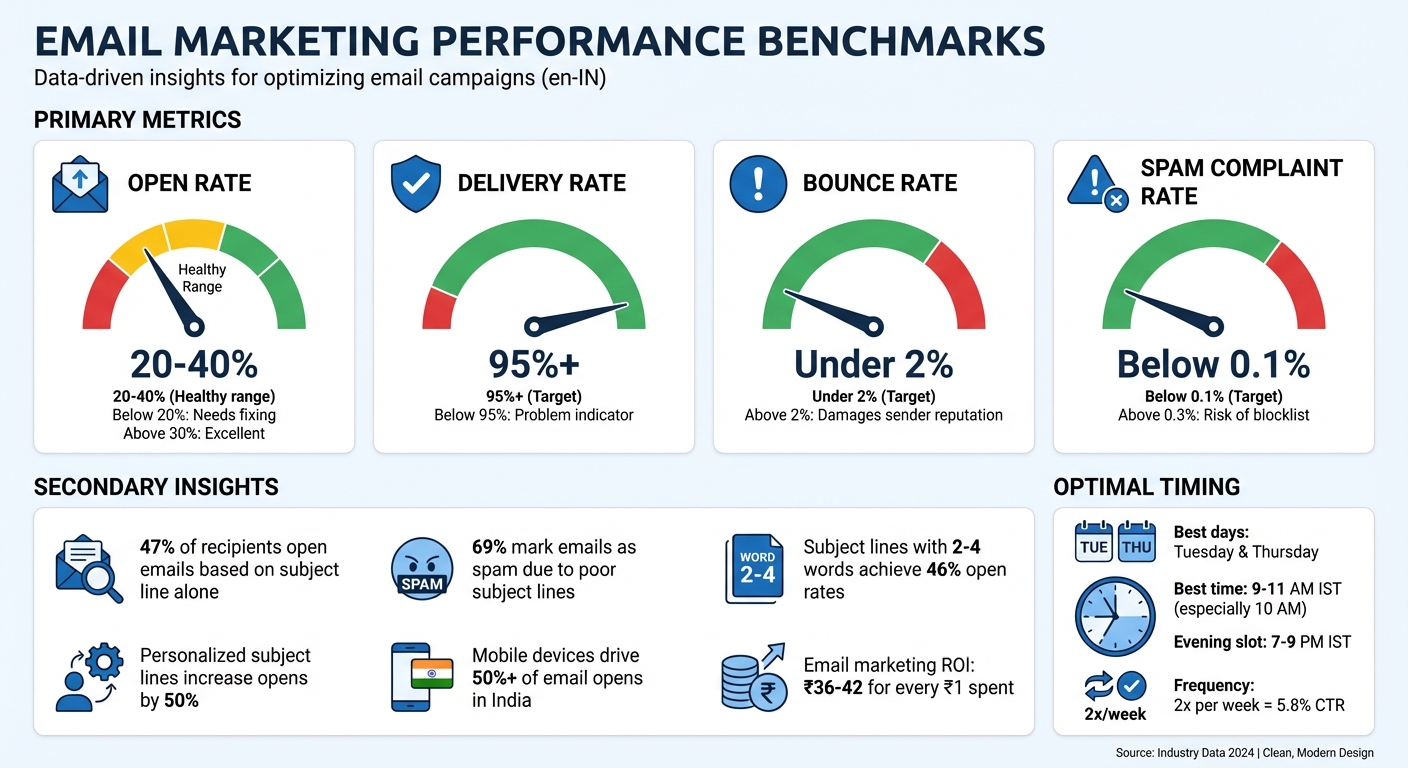
- Healthy open rates: Aim for 20–40%; anything below 20% needs fixing.
- Key metrics to monitor: Delivery rate (above 95%), bounce rate (below 2%), and spam rate (under 0.1%).
- Common issues: Boring subject lines, impersonal sender names, inactive subscribers, and poorly timed emails.
- Practical solutions: Use engaging subject lines, use omnichannel marketing features like AI segmentation and automation to personalise content and send emails at optimal times (e.g., 10:00 a.m. IST on Tuesdays or Thursdays).
- Leverage tools: Platforms like Messagesuite can help with analytics, segmentation, and automation.
Fixing open rates improves engagement, protects your sender reputation, and boosts revenue. Read on for detailed strategies and examples.
How to Maximize Your Email Open Rates and Deliverability
How to Identify Why Your Email Open Rates Are Low
Email Marketing Metrics Benchmarks and Target Ranges
To tackle low email open rates, you need to dig into your data and identify the root causes instead of relying on assumptions.
What Email Open Rate Numbers Mean
Email open rate refers to the percentage of delivered emails that recipients actually open. For e-commerce businesses in India, a healthy open rate generally ranges between 20% and 40%. If your rate is above 30%, you're doing well. But if it drops below 20%, it's time to take action.
However, open rates alone don’t provide the full picture. Keep an eye on these additional metrics:
- Delivery rate: Should be 95% or higher. Anything lower could signal issues with your email list quality.
- Bounce rate: Ideally under 2%. A high bounce rate can harm your sender reputation.
- Spam complaint rate: Should stay below 0.1% to avoid being flagged by email providers.
Your sender reputation - determined by how recipients interact with your emails - plays a big role in whether your messages land in inboxes or get filtered as spam. For instance, Gmail evaluates factors like bounce rates and spam complaints when deciding where to place your emails.
Since 2021, Apple’s Mail Privacy Protection has made open rates less reliable. It pre-loads images, which counts as an "open" even if the recipient hasn’t actually viewed the email.
"A lot of your email deliverability depends on how people are engaging with your email. Are they not opening? Are they bouncing? Are they marking it as spam? Or are they opening, clicking, reading, and engaging with your content?"
- Desirae Odjick, Product Marketing Lead for Shopify Messaging
By understanding these metrics, you can better diagnose why your open rates might be falling.
Why Email Open Rates Drop
Low open rates can stem from several issues, with weak subject lines being one of the most common. If your subject line doesn’t grab attention in a crowded inbox, your email may go unnoticed. Similarly, using impersonal sender names like "noreply@yourstore.com" can erode trust.
Another major factor is poor targeting. Sending the same email to your entire list - without considering differences between new subscribers and repeat customers - can lead to disengagement. Inactive subscribers, who haven’t interacted with your emails in months, can further drag down open rates and harm your sender reputation.
Timing also matters. Emails sent at odd hours, such as 3:00 AM IST, or on days when recipients are less likely to check their inbox, can get buried. Additionally, generic content that lacks personalisation or relevance fails to motivate recipients to open your emails.
Identifying these issues is the first step toward creating emails that connect with your audience.
Using Messagesuite Analytics to Find Problems
Messagesuite Analytics can help you pinpoint the exact reasons behind your low open rates. Start by reviewing key metrics such as delivery rate, open rate, click-through rate, and bounce rate. If open rates are consistently low across all campaigns, the issue might lie with your subject lines or the timing of your emails. On the other hand, if certain segments show poor engagement, it could indicate problems with audience targeting or list quality.
For example, Messagesuite lets you drill down into your bounce rate by showing which email addresses are invalid or undeliverable. Removing these addresses can improve your sender reputation. Similarly, monitoring your spam rate is crucial - providers like Gmail and Yahoo expect spam rates to stay below 0.3%, but aiming for under 0.1% is even better.
For businesses in India, analysing send times is particularly important. Compare campaigns sent at different times and days to identify when your audience is most active. Generally, Tuesday and Wednesday mornings around 10:00 AM IST tend to perform well, but your audience’s habits may vary.
In 2025, the Shopify-based brand 304 Clothing used dynamic segmentation to refine their email strategy. By cutting their email list by 50% and creating 15 targeted segments for active subscribers, they doubled their open rates and tripled click-through rates within one quarter. This change contributed to a 17.5% boost in revenue.
| Metric | Target Benchmark | What It Indicates |
|---|---|---|
| Delivery Rate | 95% or higher | Below 95% may indicate fake or expired addresses |
| Open Rate | 20%–40% | Low rates suggest weak subject lines or poor timing |
| Bounce Rate | 2% or less | High rates can damage your sender reputation |
| Spam Rate | Below 0.1% | Rates above 0.3% risk being blocklisted |
Using Messagesuite’s segmentation tools, you can create an "engaged subscribers" group - those who’ve opened an email in the last 30 to 90 days - and compare their performance against your entire list. This analysis can reveal whether inactive subscribers are dragging down your metrics and whether it’s time to clean up your email list.
How to Write Emails That Get Opened
Crafting emails that grab attention starts with optimising the three elements that your audience sees first: the subject line, sender name, and preview text. These small but mighty details can make or break your email's success. Let’s dive into how you can make them work for you.
Better Subject Lines and Sender Names
The subject line is the most influential factor in determining whether someone opens your email. In fact, 47% of recipients open emails based on the subject line alone, while 69% mark emails as spam for the same reason.
What makes a subject line effective? It’s all about creating a curiosity gap - a balance between revealing just enough to intrigue the reader without giving everything away. Too much clarity can feel dull, while too much mystery might come off as clickbait and hurt your credibility.
Here are some tips for crafting better subject lines:
- Use questions, urgency, benefits, or social proof to spark interest. Examples include: "Are you washing your hair properly?", "LAST CALL 📣 Free Mini Milk Drops", or "Top reviewed styles from customers like you".
- Opt for active verbs like "Transform", "Grab", or "Stop" to create a sense of action.
- Keep subject lines concise for mobile users in India. Aim for 25–60 characters or 3–7 words, as shorter lines are more likely to display fully on small screens. Interestingly, subject lines with just 2–4 words achieve the highest open rates at 46%.
- Personalisation works wonders. Adding a recipient's first name can boost open rates by 10% to 14%, and personalised subject lines can result in a 50% increase in opens.
Emojis can add a playful touch and increase click-through rates by 28%, but don’t overdo it. Stick to 1–2 relevant emojis to avoid cluttering the subject line or triggering spam filters. And speaking of spam, steer clear of words like “Free,” “Cash,” “Money,” or “Win,” which can send your email straight to the junk folder.
"Without a persuasive subject line that piques curiosity, your email body copy can't do the work it was destined to do." - Tiff Regaudie, Writer and Content Consultant, Klaviyo
Your sender name is just as critical. Use a recognisable and trustworthy name instead of something generic like "noreply@yourstore.com." Consistency is key - it helps build trust and ensures your audience associates your emails with your brand. If you’re experimenting with tweaks (like adding an emoji), test them on a small segment before rolling them out to your entire list.
Making Preview Text Work Harder
Preview text, or the preheader, is the snippet that appears next to or below your subject line in the inbox. Think of it as a subtitle that adds context to your subject line. Emails with well-crafted preview text enjoy an average open rate of 44.67%, which is significantly higher than the industry average.
Here’s how to make the most of it:
- Avoid repeating the subject line. Instead, use the preview text to build anticipation, provide extra details, or hint at the email's value.
- Keep it short and sweet - 55–60 characters is ideal to ensure it doesn’t get cut off in most inboxes.
- If you don’t set a custom preheader, email providers will pull the first line of your email body, which often looks messy or unhelpful.
- For promotional emails, highlight incentives like discounts or gifts not mentioned in the subject line. For announcements, tease the key details to spark curiosity.
"If your subject line is the title, your preheader is the subtitle that adds context." - Maropost
Designing Emails for Mobile Phones
With mobile devices driving over 50% of web traffic in India, designing emails for smartphones is no longer optional - it’s essential. During the holiday season, 44.2% of emails are opened on mobile devices, and iPhone users often see only 33–41 characters of a subject line.
Here are some best practices for mobile-friendly email design:
- Use responsive templates that adapt layouts, font sizes, and images to any screen size.
- Break content into short paragraphs (2–5 sentences) and use bulleted lists sparingly for easy reading.
- Include plenty of white space and visuals like photos or illustrations to keep emails visually appealing and avoid overwhelming readers with dense text.
- Design CTA buttons that are touch-friendly, with clear, high-contrast colours.
- Optimise images for faster loading, especially for users with slower internet speeds.
"Try not to pack too many things in. You want it to be focused and somewhat simple." - Josh Rosenblat, Senior Editor, Shopify
Avoid overly aggressive formatting like all-caps or excessive punctuation, which can come across as pushy or trigger spam filters. Use dark, high-contrast fonts for readability, add alt text to images, and ensure all content is accessible via keyboard navigation.
Using Messagesuite AI for Better Targeting and Personalization
Getting the right message to the right person at the right time might sound straightforward, but it's a challenge where many email campaigns stumble. AI-powered tools can step in to bridge this gap, helping businesses analyse customer behaviour, predict preferences, and automate personalization on a large scale.
AI-Powered Customer Segmentation
Messagesuite's Smart Segmentation uses AI and machine learning to automatically group customers based on Shopify order data, purchase trends, demographics, and customer metafields. Unlike traditional static lists, these dynamic segments update themselves - adding customers who meet specific criteria and removing those who no longer qualify.
The platform offers multiple ways to segment customers. For example, RFM modeling (Recency, Frequency, Monetary value) helps you identify your most loyal customers as well as those at risk of disengaging. Demographic filters allow targeting by location, age, or gender. This means you can craft region-specific campaigns, like promoting monsoon gear to shoppers in Mumbai or winter wear to those in Shimla [39,43]. Behavioural segmentation takes it further by tracking actions like browsing history or cart abandonment, enabling campaigns that respond directly to customer intent.
"Shopify has introduced a powerful new way to segment customers so we can send them content and campaigns that engage them."
- Aaron Zack, VP of Sales and Marketing, Propeller Coffee
Real-life examples show the impact of segmentation. Propeller Coffee used location-based and purchase history segmentation to boost email conversion rates by 175%. Airsign, another brand, targeted customers who had purchased vacuums but not subscribed to replacement filters. By offering a personalised discount, they achieved a 30% conversion rate [38,44].
Automated workflows can also deliver impressive results. For instance, you could set up VIP emails triggered when a customer reaches a lifetime spend of ₹30,000, assuming an average order value of ₹3,000. Birthday-themed emails are another effective strategy, generating nearly seven times more revenue than standard promotional emails. With 91% of customers more likely to shop with brands that recognise them, these automated, segment-based strategies can directly boost revenue.
Once you've segmented your audience, the next step is crafting personalised content that resonates with each group.
Personalised Emails for Large Audiences
Dynamic segmentation lays the foundation for creating emails that feel personal - even when sent to large groups. Personalisation goes far beyond adding a recipient's name. Messagesuite AI helps by generating subject lines and email content that pull live store data, including pricing, product details, and checkout links, directly into your email editor. This ensures your emails are always up-to-date with current inventory and offers, without requiring manual updates.
The platform also optimises send times by analysing each recipient's past behaviour to determine when they're most likely to open emails. For instance, scheduling emails to land during lunch breaks or evenings can significantly improve engagement compared to sending them at odd hours. Grouping subscribers by local time zones further ensures messages reach them at the right moment.
Geographic data adds another layer of relevance. You can send weather-specific promotions, like advertising air conditioners to customers in hot regions during summer or promoting umbrellas in areas experiencing heavy rainfall [39,43]. With 72% of consumers engaging only with marketing tailored to their interests, this level of customisation can significantly improve open rates.
"We identified the segment in Shopify, created a discount for that specific segment, communicated with them in a way that was very personalised for their needs, and we saw about 30% of those people convert."
- Alex Dashefsky, Cofounder, Airsign
AI-driven personalisation isn't just effective - it scales efficiently. Automated emails account for 37% of total sales while making up only 2% of total email volume. Retailers using personalised marketing have also reported reduced customer acquisition costs by up to 50% and revenue increases of up to 15%. Messagesuite makes this even more accessible by offering 10,000 free emails per month, with additional sends priced at just ₹83 per 1,000 emails (around $1) [38,42].
sbb-itb-e5ef79e
When to Send Emails and How to Clean Your List
Even the most personalised email can fall flat if it's sent at the wrong time or to an outdated, inactive list. Getting the timing right and maintaining a clean email list are crucial for improving open rates and ensuring your emails actually reach engaged recipients. These strategies work hand-in-hand with content and personalisation to maximise your email marketing efforts.
Finding the Right Time to Send
For Indian audiences, the best time to send emails is typically between 9 a.m. and 11 a.m. IST, with Tuesdays and Thursdays consistently showing higher open rates. For e-commerce businesses, mid-morning - around 10 a.m. - on these days is particularly effective, as it catches shoppers during their early-week routines. Evening slots, from 7 p.m. to 9 p.m., also perform well because many people check personal emails after work.
Paydays, which usually fall on the 1st and 30th of each month, are another prime opportunity, as consumers are more likely to make purchases after receiving their salaries. During high-demand periods like Diwali sales or Black Friday, consider increasing your email frequency to stay visible. For example, sending multiple emails per day during these events can drive better results.
"We're recommending for all of our brands to send three emails on Black Friday, multiple emails on Cyber Monday... during this timeframe, we're ramping up."
- Jacob Sappington, Director of Email Strategy at Homestead Studio
Tools like Messagesuite can help you optimise send times in IST, even if you're managing campaigns from another time zone. You might also experiment with less competitive time slots, like lunch hours or late evenings, to see if they yield better results. Data shows that sending emails twice a week achieves a 5.8% click-through rate, compared to 5% for weekly sends. On the flip side, irregular schedules can lead to a 125% increase in unsubscribe rates.
Once you've nailed the timing, the next step is ensuring your email list is active and relevant.
Keeping Your Email List Clean
A clean email list is essential for maintaining engagement and protecting your sender reputation. Start by using a double opt-in process to ensure subscribers genuinely want to hear from you. Remove hard bounce addresses immediately, as a bounce rate above 2% can harm deliverability. For inactive subscribers (those who haven’t engaged in three to six months), attempt to re-engage them - but don’t hesitate to remove them if they remain unresponsive.
For example, a Shopify-based brand saw a noticeable improvement in open rates and revenue by removing inactive subscribers and segmenting their remaining audience.
"A lot of your email deliverability depends on how people are engaging with your email. Are they not opening? Are they bouncing? Are they marking it as spam?"
- Desirae Odjick, Product Marketing Lead, Shopify Messaging
Conduct a thorough list audit every three to six months to keep your database up to date. Make it easy for users to unsubscribe - mailbox providers flag spam complaints when rates exceed 0.1% (1 complaint per 1,000 emails). Remember, email lists naturally shrink by about 22% annually as people change or abandon their email addresses. Regular maintenance is key to maintaining strong open rates and overall campaign performance.
Using Messagesuite Automation to Improve Results Over Time
Building on the concepts of targeting and timing, automation takes email marketing to the next level by sending messages based on real-time customer actions. This means setting up workflows that react immediately to what customers do, delivering messages right when they're most relevant. The result? Not only does this save time, but it also boosts open rates because the emails are triggered by specific customer behaviours.
Automated Workflows for Better Campaigns
There are three workflows you should prioritise: welcome emails, abandoned cart recovery, and post-purchase follow-ups.
- Welcome emails: These tend to achieve high open rates because they reach subscribers at the moment of peak interest - right after they sign up.
- Abandoned cart recovery: Timing is critical here. Send the first email within 1–4 hours of cart abandonment when the customer's interest is still fresh. Waiting too long can drastically reduce your chances of recovery - from 100% in the first hour to just 5% after 72 hours.
- Post-purchase follow-ups: These emails help maintain engagement and build loyalty after a customer makes a purchase.
Here’s an example: In 2025, Micki Krimmel, founder of Superfit Hero, launched a 40-day automated welcome series that became the brand’s top-performing channel, with an 8% conversion rate - higher than organic search and social media ads. The series included a 10% discount for new subscribers, which increased to 15% after a month for those who hadn’t purchased yet. It also encouraged subscribers to join the brand’s Facebook community.
For abandoned cart recovery, a three-email sequence works well: send one email an hour after abandonment, another after 24 hours, and a final reminder at 72 hours. After the last email, end the sequence to protect your sender reputation.
You can also use win-back campaigns to re-engage subscribers who’ve been inactive for 30, 60, or 90 days. These campaigns can help reverse disengagement before it becomes permanent. Although automated emails make up just 2% of total email volume, they account for 37% of sales, with abandoned cart sequences averaging a 50% open rate across e-commerce industries. These workflows are a perfect complement to your overall email strategy, ensuring timely and relevant communication.
Tracking Performance with Real-Time Data
A good analytics dashboard is your best friend for monitoring performance. It tracks key metrics like reach, sessions, orders, and sales for each workflow. Tools like the Email Conversion Funnel help you see the entire customer journey - from opening an email to adding items to a cart and completing an order. This makes it easier to pinpoint where customers are dropping off.
For instance, if you notice strong open rates but low clicks, the issue might lie in your email content or call-to-action. On the other hand, if clicks are high but conversions are low, it’s time to revisit your landing pages.
"A lot of your email deliverability depends on how people are engaging with your email. Are they not opening, are they bouncing, are they marking it as spam? Or are they opening, clicking, reading, engaging with your content?"
- Desirae Odjick, Product Marketing Lead, Shopify
Keep a close eye on your delivery rate - anything below 95% is a red flag that your list needs cleaning. Remove hard bounces and create segments based on engagement, such as subscribers who’ve opened an email in the last three months. This can improve deliverability for future campaigns.
Real-time revenue analytics, which use a last-non-direct click attribution model, show the financial impact of each campaign. This allows you to make data-driven decisions about where to focus your efforts. Considering that email marketing delivers an average ROI of ₹36 for every ₹1 spent, these insights are invaluable for maximising returns.
Summary: How to Fix Low Email Open Rates
To tackle low email open rates, start by identifying the underlying issues. Calculate your open rate by dividing unique opens by delivered emails (sent emails minus bounces), and compare it to industry benchmarks, which usually range from 17% to 28%. If your numbers are below average, examine key elements like subject lines, sender names, and preview text. Keep subject lines concise - ideally under 50–60 characters - and use personalisation to increase open rates by as much as 50%. This step sets the stage for actionable improvements outlined in the guide.
Once your content and audience segmentation are on point, focus on timing and maintaining a healthy subscriber list. Use double opt-in forms to ensure subscribers genuinely want your emails, and avoid spam trigger words like "FREE" or "Buy Now". Since most emails are now opened on mobile devices, ensure your emails are mobile-friendly. Segmentation is key - targeted campaigns can achieve 14.31% higher open rates than generic ones. Tools like Messagesuite AI can help create micro-segments based on user behaviour, such as purchase history or browsing patterns.
Timing matters, too. Schedule emails between 9 a.m. and 5 p.m. on weekdays, as this is when 53% of email opens occur. Protect your sender reputation by implementing a sunset policy to remove subscribers who haven’t engaged in six months. Regularly clean your email list - every 30–45 days - to eliminate hard bounces and inactive users.
Finally, leverage automation and A/B testing to fine-tune your campaigns. Messagesuite's real-time analytics can help track metrics like delivery rates, open rates, and revenue attribution. Businesses that frequently A/B test their emails see 37% higher open rates. Test one variable at a time, such as subject lines, sender names, or send times, to understand what resonates best with your audience. With email marketing yielding an average ROI of ₹42 for every ₹1 spent, these strategies can significantly enhance your results.
FAQs
What should I track besides open rate to find the real issue?
To truly understand how your emails are performing, don’t just stop at the open rate. Keep an eye on other key metrics like click-through rate (CTR), click-to-open rate (CTOR), conversion rate, bounce rate, unsubscribe rate, and revenue per email (RPE). These numbers give you a deeper look into how recipients are interacting with your emails. Are they clicking through but not converting? Or maybe they’re unsubscribing more than expected? Each metric offers clues about potential issues - whether it’s a matter of deliverability, content quality, timing, or relevance. Analysing these data points will help you pinpoint what’s working and what needs fixing.
How do I improve opens when Apple Mail inflates open rates?
To address the inflated open rates resulting from Apple Mail Privacy Protection (MPP), shift your focus to more reliable metrics like click-through rates, conversions, and overall engagement. Improve your subject lines and preheader text to encourage genuine interaction, and make use of audience segmentation to refine your targeting efforts. Since MPP preloads images, open rates may no longer provide accurate insights, so prioritise click and conversion data to evaluate your campaign’s performance effectively.
When should I remove inactive subscribers from my list?
It’s a good idea to remove subscribers who haven’t interacted with your emails for 3 to 6 months. Keeping inactive users on your list can hurt your sender reputation and drag down engagement metrics. By cleaning your email list regularly, you can improve deliverability, ensure your messages reach active readers, and see better open rates and overall campaign results.